1. Before You Begin
1.1. About
This document is intended for enterprise developers who wish to integrate maya.ai Choice API into their digital channels or build 'Taste Enabled' choice applications.
1.2. What to expect
This document will provide you with a basic walkthrough of the maya.ai API and the key concepts required for successful integration into any digital channel.
1.3. Prior Knowledge
This document assumes you are clueless as it comes to maya.ai and hence, will bring you up to speed with the basics you need to get started. At the same time, we do assume you are experienced in consuming online REST APIs in whatever your favourite development environment is. If you are not, please look it up online as it is beyond the scope of this document.
2. About Our maya.ai
We live in an age whereby choices are available everywhere. In fact too many of them… Did you know that if you are presented with more than 6 or less than 4 choices you are likely to have a hard time making a choice? It is even likely that you will postpone the decision. Compound that with the Google results page on each and every search you do. Page after page of information that you simply can’t process. Haunting. Isn’t it? This is why we built maya.ai.
maya.ai is the name of our product. You will be using maya.ai as a set of APIs. This is what you need to know about it. For now…
maya.ai is the only choice engine globally which is centred around 'Taste'. It is powered by a global Taste Graph that allows connecting various objects by taste. To give you an idea: Our Taste Graph knows about every digitally discoverable restaurant on this blue planet and connects them all to each other by taste. Pause! pick two distinct restaurants that are completely not related and appreciate the fact that we actually scored how closely these two are related by the taste of people. We think it’s awesome!
Next big piece of maya.ai is the ‘Maestro’, the Choice.AI engine. It has numerous taste algorithms orchestrated in real time (also in batches) working for maya.ai’s choice engine, the Choice.AI. It provides you with the best set of lifestyle choices to showcase on your application.
maya.ai recommended choices perform better with customer response on almost every aspect that you can imagine. This is because maya.ai is trained to balance between ‘discovery’ and ‘reinforcement’ (of behaviour) when selecting the right mix of choices to present. It also cleverly knows how to predict as well as optimise the best choices for a specific objective (like I want to surprise people by the choices I present, or I want to make sure they simply take it by feeling comfortable).
Our choice engine Choice.AI is built with machine learning technology embedded. So, you can be rest assured that with the loopback mechanism we introduced, maya.ai will serve not only the best choices from the get go, but maya.ai will also be able to learn and respond to the slightest clues customers can provide. Implicit; like page view, time spent on a page etc. or explicit; like adding something to the favorites.
When you get to read this, most of the heavy lifting is already done. The relevant data has been provided to maya.ai; maya.ai has already processed and calculated taste fingerprint used to guide the choices it issues to each and every customer.
maya.ai is crafted with Love @ Singapore and Chennai, India.
We hope you enjoy this read.
- The maya.ai Product Team
3. Overview
By the end of this document, you should be able to know exactly what you need to do to get your application to showcase maya.ai recommended choices and how to engage customers with campaigns targeted by taste.
The getting started section will help you make sure you have everything you need and also cover one important piece of terminology. Then, we will cover the main data model leading to examples.
The API reference is best used when actually getting into development. Easy to come back to the documentation.
We also did our best to include an effective FAQ list. For any recommendations please drop us a line at support@crayondata.com.
4. Getting Started
Before you begin let’s get you setup with the basics.
4.1. Setup up your Swagger
We use Swagger to provide you with interactive API and more documentation. Access to Swagger UI should be provided to you by your project manager once your maya.ai Choice API is all setup and ready for action.
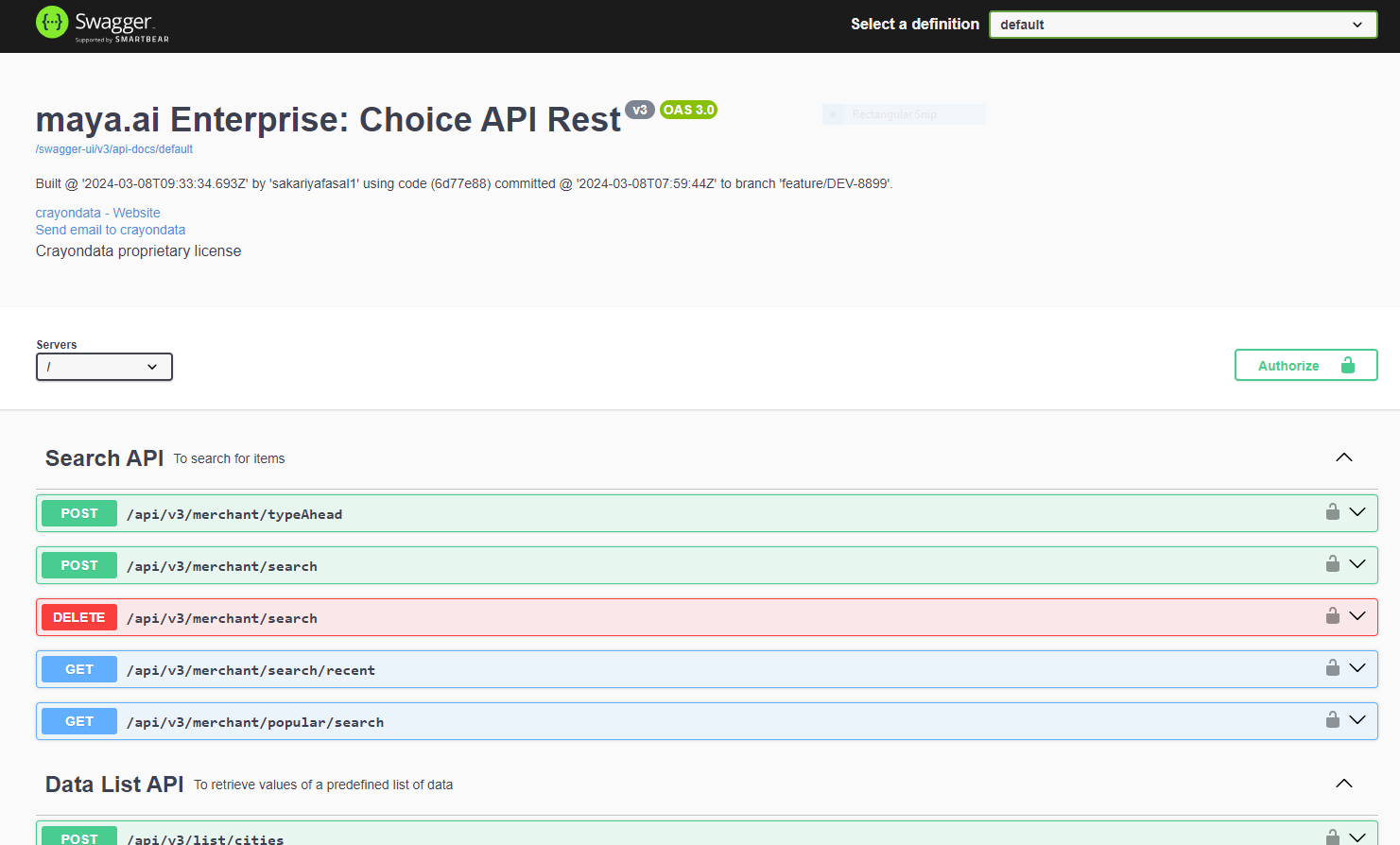
Once you get the link, follow one of the two approaches to authorize for access:
API Key based authentication :
. Along with the API Link you should get an API key
. Go to the swagger ui and click on 'Authorize' button on the top right corner
. Enter the API key provided in the 'api_key' text box
. Click on the ‘Authorize’ button to complete
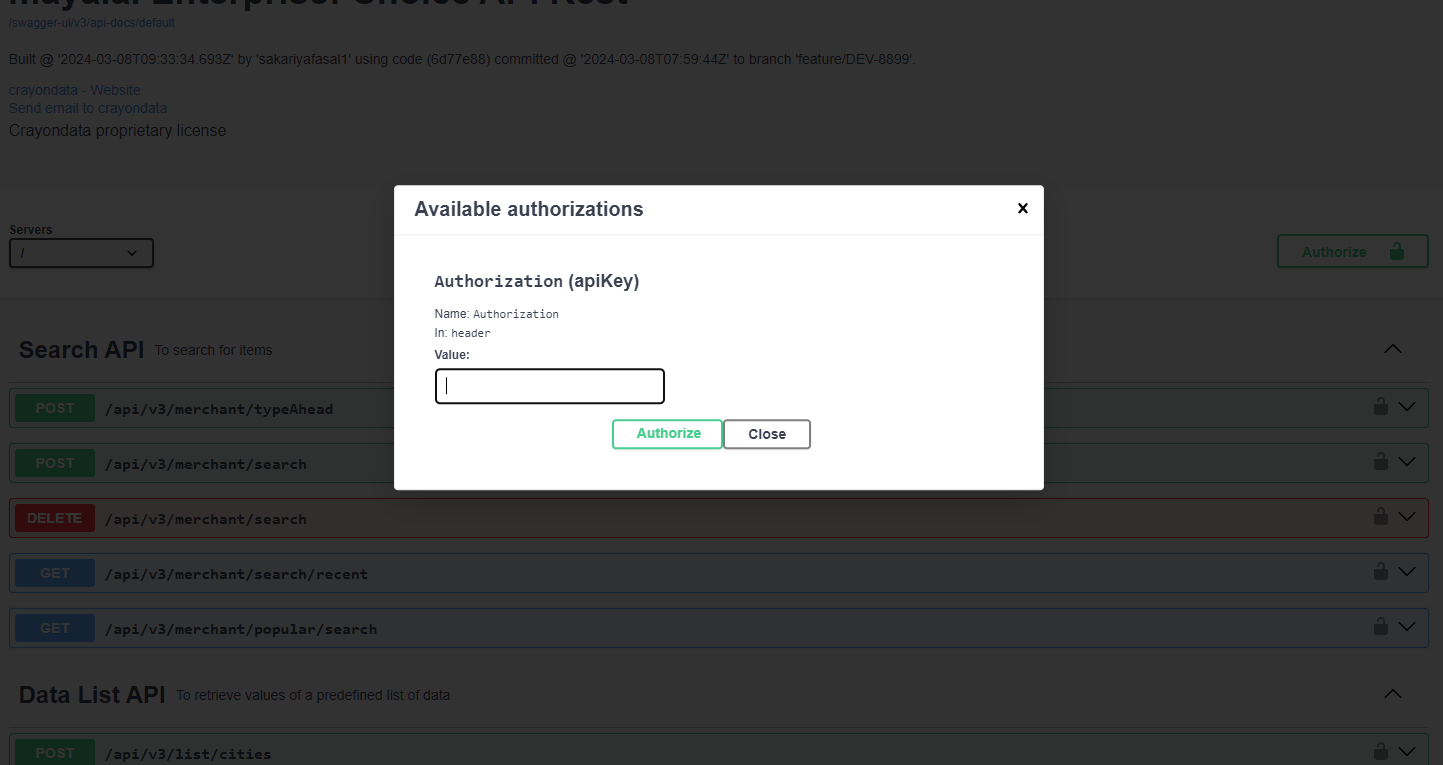
That’s it, now you should be able to get access to the maya.ai choice API online documentation.
To make sure you are all good to go, simply test this in your browser.
In Swagger UI, expand 'Data List API' and select '/api/v3/list/{id}' and key in inputs as below:
'id' |
cities |
You should be getting something like this:
{
  "id": "list-cities",
  "description": "List of available cities",
  "items": [
    {
      "label": "Abu Dhabi",
      "value": "Abu Dhabi"
    }

    ...
  ]
}
5. Key Concepts
5.1. Boundaries
maya.ai Choice API does one thing well. It gets you the best set of choices to present to your users based on the context with which you have consumed the APIs and basis the set of filters you apply. That’s it. To make sure bounties are clear, and you do not misuse maya.ai to other ends.
maya.ai does not manage your application state.
maya.ai does not handle complicated state reconciliation.
maya.ai does not manage your user profile.
maya.ai lists the best choices to be presented during a given session.
maya.ai is obsessively collecting taste signals to serve better and better choices.
What is BEST CHOICES? Or BETTER CHOICES?
The quality of choice is measured by the response triggered by the customer and the level of trust you build by presenting things that may be new to them, but still relevant. This is all that maya.ai does.
5.2. Managing User Identity
maya.ai operates on an anonymized userId or a UUID auto-generated at the client application(web or mobile app) to identify a unique user.
User Access Token:
It is mandatory for each and every API call to include this token and is essential for getting the correct relevant choices for your user. The client application should make sure to manage the user identities it uses to retrieve choices from maya.ai Choice API.
It can be obtained in two ways as follows,
5.2.1. API-Key based authentication
|
The user access token must be a device ID or a UUID having a length of 36 characters of the following format: xxxxxxxx-xxxx-xxxx-xxxx-xxxxxxxxxxxx where x is a hexadecimal digit. Eg. 7faeba52-9217-40db-9def-af9c80fedc47 |
5.3. Choices
Choices are a set of selections that can be presented to a user. This can include and is not limited to Restaurants, Stores, Brands, Offers, Products etc.. maya.ai focuses on lifestyle choices.
The abstract form of a choice resembles a promotion or a product. It may have a title, description, image, an offer (discount), address, contact number etc..
Choices will be tagged with an id to help keep a reference of them. It is advised you do not cache choice lists or specific choice id and always rebuild your application state on application startup.
5.4. Interactions
We already mentioned that maya.ai is enabled with machine learning engine, Choice.AI. While maya.ai learns implicitly (like Google) by the nature of the activity over the API, Application must also report back to maya.ai on key users interactions. This loopback makes sure that maya.ai is up-to-date with the taste preferences of the users.
This API has no desire to manage the user profile. It is up to you. However, the interactions of the user must be reported to maya.ai.
Below is the list of possible interactions.
LIKE |
User likes a choice (Add to favorites) |
UNDO_LIKE |
User un-likes a choice (Remove from favorites) |
WISHLIST |
User wishlists a choice |
UNDO_WISHLIST |
User removes wishlisted choice from wishlisted list |
DISLIKE |
User does not like a choice |
VIEW |
User viewed choice details |
SEARCH |
User searched for a choice |
BUY |
User bought a specific choice presented |
CLAIM |
User claims an offer which is present as part of choice item |
Clearly, your applications may not implement all of the above interactions, however, if you are presenting choices to your users, making sure that favourites are included in you application design is strongly recommended. In case your product manager decides against it, you can still use the VIEW interaction as a fallback.
There is no such thing as over-communicating. Let maya.ai handle the noise and make sure to direct any piece of interaction to maximise your application performance.
Here is a simple guide to follow: If you have doubt if you should report an interaction or not, you probably should. Simple.
5.5. Campaigns
Campaigns are themed group of choices that may be made available to some users at some period of time. An example could be ‘Christmas Special’ offers provided to all user from Dec 1 - Dec 31 or ‘Summer Vacations’ made available only to the customer who like to travel during summer (depending on where you are on the globe.)
Applications should check to see on startup if there is a campaign the specific user is eligible for. Once identified, the application can retrieve and render the information required around the specific campaign. Campaigns are denoted by 'campaignToken' and 'knownUserId' in the Choice API.
Note that at any given point of time, users may be eligible to some campaigns and at times to none. The list of campaigns is not really limited to a specific number per user, but please do put in place the correct measures to accommodate more if needed around the UX you design.
5.6. Filters
maya.ai Choice API allows you to reduce the number of choices the API returns. We recommend always to set the number of choices you retrieve to 18 (see note). However, you can actively ask maya.ai to provide you with the best choices for dining in a specific location, a specific city or serving a specific cuisine. This is accomplished with filters.
When submitting your POST request to get choices, the body of your REST request will carry a ChoiceRequest json that will describe what filters you wish to apply on the request.
These filters may include filter choices to a specific country (in case you have international coverage) or even to a GeoCode level. There are more filters (check the API documentation)
The term filter is specifically used as maya.ai will always work against an infinite list of choices, ranked and ordered by the user’s taste. Filter essentially removes the ones that do not match the filter criteria and retains the respective rank ordering with respect to the user taste.
When choices are returned, they are always listed by their taste relevance to the user. We call that taste relevance the 'Taste Affinity' of the user.
When displaying the choices in an order different from that returned by maya.ai, you are actually showing less relevant choices to the user. This is more than valid in certain use cases (e.g. client side sort), but consider presenting the choices in the order maya.ai provides most of the time.
6. Examples
Here are some simple examples for common tasks you would like to accomplish and include in your project.
6.1. Common APIs
6.1.1. Example 1: Get Campaigns
Get the list of campaigns
In Swagger UI, Expand 'User Profile and Campaigns' and select '/api/v3/user/campaigns'.
Unresolved directive in examples.adoc - include::../../../target/generated-snippets/testGetCampaigns/auto-request-parameters.adoc[]
Key in inputs as below:
Unresolved directive in examples.adoc - include::../../../target/generated-snippets/testGetCampaigns/http-request.adoc[]
where 'User-Access-Token' is a UUID generated at client side(or a device ID) representing an user +
And you should be getting output as below:
Unresolved directive in examples.adoc - include::../../../target/generated-snippets/testGetCampaigns/http-response.adoc[]
6.1.2. Example 2: Get choices for specific category and list type
Get choices for specific category and list type
In Swagger UI, Expand 'Choice API' and select '/api/v3/choice/list'
Unresolved directive in examples.adoc - include::../../../target/generated-snippets/testChoiceListWithCategoryListType/auto-request-fields.adoc[]
Key in inputs as below:
Unresolved directive in examples.adoc - include::../../../target/generated-snippets/testChoiceListWithCategoryListType/http-request.adoc[]
You should be getting output as below:
Unresolved directive in examples.adoc - include::../../../target/generated-snippets/testChoiceListWithCategoryListType/http-response.adoc[]
where in request, 'totalCount' is the number of items that match the given list type & number of
choices returned as response at maximum is equal to 'choiceCount' which is given in the request
6.1.3. Example 3: Get choices for all supported list types and categories
In Swagger UI, Expand 'Choice API' and select '/api/v3/choice/list'
Unresolved directive in examples.adoc - include::../../../target/generated-snippets/testChoiceList/auto-request-fields.adoc[]
Key in inputs as below:
Unresolved directive in examples.adoc - include::../../../target/generated-snippets/testChoiceList/http-request.adoc[]
And you should be getting output as below:
Unresolved directive in examples.adoc - include::../../../target/generated-snippets/testChoiceList/http-response.adoc[]
6.1.4. Example 4: Get a specific choice details
Get details of an offer item from choice based on its ID
In Swagger UI, Expand 'Choice API' and select '/api/v3/items/{itemId}'
Unresolved directive in examples.adoc - include::../../../target/generated-snippets/testGetItemDetails/auto-path-parameters.adoc[]
Unresolved directive in examples.adoc - include::../../../target/generated-snippets/testGetItemDetails/auto-request-parameters.adoc[]
Key in inputs as below:
Unresolved directive in examples.adoc - include::../../../target/generated-snippets/testGetItemDetails/http-request.adoc[]
And you should be getting output as below:
Unresolved directive in examples.adoc - include::../../../target/generated-snippets/testGetItemDetails/http-response.adoc[]
6.1.5. Example 5: Get the similar choice details
Get details of similar offer items from choice based on its ID
In Swagger UI, Expand 'Choice API' and select '/api/v3/items/similar'
Unresolved directive in examples.adoc - include::../../../target/generated-snippets/testGetSimilarItems/auto-request-fields.adoc[]
Key in inputs as below:
Unresolved directive in examples.adoc - include::../../../target/generated-snippets/testGetSimilarItems/http-request.adoc[]
And you should be getting output as below:
Unresolved directive in examples.adoc - include::../../../target/generated-snippets/testGetSimilarItems/http-response.adoc[]
6.1.6. Example 6: Interacting on a choice item and offer
Interact(Like, Dislike …) on an item or offer which is part of item from the choice based on its ID
In Swagger UI, Expand 'UserProfile and Campaigns API' and select '/api/v3/user/interact'
Unresolved directive in examples.adoc - include::../../../target/generated-snippets/testInteractingChoiceItem/auto-request-fields.adoc[]
Key in inputs as below:
Unresolved directive in examples.adoc - include::../../../target/generated-snippets/testInteractingChoiceItem/http-request.adoc[]
where 'value' is the ID of the choice item or offer which is part of choice item.
And you should be getting output as below, which indicates the status of the interaction:
Unresolved directive in examples.adoc - include::../../../target/generated-snippets/testInteractingChoiceItem/http-response.adoc[]
6.1.7. Example 6 ii): Like interaction
Interact(Like) on an item or offer which is part of item from the choice based on its ID
In Swagger UI, Expand 'UserProfile and Campaigns API' and select '/api/v3/user/interact'
Unresolved directive in examples.adoc - include::../../../target/generated-snippets/testLikeInteraction/auto-request-fields.adoc[]
Key in inputs as below:
Unresolved directive in examples.adoc - include::../../../target/generated-snippets/testLikeInteraction/http-request.adoc[]
where 'value' is the ID of the merchant item which should be part of choice item.
And you should be getting output as below, which indicates the status of the interaction:
Unresolved directive in examples.adoc - include::../../../target/generated-snippets/testLikeInteraction/http-response.adoc[]
6.1.8. Example 6 iii): Dislike interaction
Interact(Like) on an item or offer which is part of item from the choice based on its ID
In Swagger UI, Expand 'UserProfile and Campaigns API' and select '/api/v3/user/interact'
Unresolved directive in examples.adoc - include::../../../target/generated-snippets/testDisLikeInteraction/auto-request-fields.adoc[]
Key in inputs as below:
Unresolved directive in examples.adoc - include::../../../target/generated-snippets/testDisLikeInteraction/http-request.adoc[]
where 'value' is the ID of the merchant item which should be part of choice item.
And you should be getting output as below, which indicates the status of the interaction:
Unresolved directive in examples.adoc - include::../../../target/generated-snippets/testDisLikeInteraction/http-response.adoc[]
6.1.9. Example 6 iv): View interaction
Interact(Like) on an item or offer which is part of item from the choice based on its ID
In Swagger UI, Expand 'UserProfile and Campaigns API' and select '/api/v3/user/interact'
Unresolved directive in examples.adoc - include::../../../target/generated-snippets/testViewInteraction/auto-request-parameters.adoc[]
Key in inputs as below:
Unresolved directive in examples.adoc - include::../../../target/generated-snippets/testViewInteraction/http-request.adoc[]
where 'value' is the ID of the merchant item which should be part of choice item.
and 'itemType' is the enum value of supported item offers. For supported item offers, refer ChoiceRequest.
And you should be getting output as below, which indicates the status of the interaction:
Unresolved directive in examples.adoc - include::../../../target/generated-snippets/testViewInteraction/http-response.adoc[]
6.1.10. Example 7: Get interaction details based on interaction type
In Swagger UI, Expand 'UserProfile and Campaigns API' and select '/api/v3/user/interaction'
Unresolved directive in examples.adoc - include::../../../target/generated-snippets/testGetInteractionDetails/auto-request-parameters.adoc[]
Key in inputs as below:
Unresolved directive in examples.adoc - include::../../../target/generated-snippets/testGetInteractionDetails/http-request.adoc[]
And you should be getting output as below, which provides details of items interacted by this user:
Unresolved directive in examples.adoc - include::../../../target/generated-snippets/testGetInteractionDetails/http-response.adoc[]
6.1.11. Example 8: Get recent location history of a user
In Swagger UI, Expand 'User Profile and Campaigns' and select '/api/v3/user/cities/recent'
Unresolved directive in examples.adoc - include::../../../target/generated-snippets/testGetRecentCities/auto-request-parameters.adoc[]
Key in inputs as below:
Unresolved directive in examples.adoc - include::../../../target/generated-snippets/testGetRecentCities/http-request.adoc[]
And you should be getting output as below, which provides details of recent cities travelled by this user:
Unresolved directive in examples.adoc - include::../../../target/generated-snippets/testGetRecentCities/http-response.adoc[]
6.1.12. Example 9: Get offers redeemed by user
In Swagger UI, Expand 'User Profile and Campaigns' and select '/api/v3/user/redeemed/offers
Unresolved directive in examples.adoc - include::../../../target/generated-snippets/testGetRedeemedOffers/auto-request-parameters.adoc[]
Key in inputs as below:
Unresolved directive in examples.adoc - include::../../../target/generated-snippets/testGetRedeemedOffers/http-request.adoc[]
And you should be getting output as below, which provides details of offers redeemed by this user:
Unresolved directive in examples.adoc - include::../../../target/generated-snippets/testGetRedeemedOffers/http-response.adoc[]
6.1.13. Example 10: Get Cities List
Get the list of cities.
The 'value' from this API can be used for filtering choices by city.
In Swagger UI, Expand 'Data List API' and select '/api/v3/list/{id}'.
Unresolved directive in examples.adoc - include::../../../target/generated-snippets/testGetDataListCities/auto-request-parameters.adoc[]
Key in inputs as below:
Unresolved directive in examples.adoc - include::../../../target/generated-snippets/testGetDataListCities/http-request.adoc[]
And you should be getting output as below:
Unresolved directive in examples.adoc - include::../../../target/generated-snippets/testGetDataListCities/http-response.adoc[]
6.1.14. Example 10 ii): Get Cities List Based on Country
Get the list of cities based on country (filter by countryValue or countryCode).
The 'value' from this API can be used for filtering choices by city.
In Swagger UI, Expand 'Data List API' and select '/api/v3/list/{id}'.
Unresolved directive in examples.adoc - include::../../../target/generated-snippets/testGetCityListFilterByCountryCode/auto-request-parameters.adoc[]
Key in inputs as below:
Unresolved directive in examples.adoc - include::../../../target/generated-snippets/testGetCityListFilterByCountryCode/http-request.adoc[]
And you should be getting output as below:
Unresolved directive in examples.adoc - include::../../../target/generated-snippets/testGetCityListFilterByCountryCode/http-response.adoc[]
6.1.15. Example 11: Get Categories List
Get the list of categories.
The 'value' from this API can be used for filtering choices by category.
In Swagger UI, Expand 'Data List API' and select '/api/v3/list/{id}'.
Unresolved directive in examples.adoc - include::../../../target/generated-snippets/testGetDataListCategories/auto-request-parameters.adoc[]
Key in inputs as below:
Unresolved directive in examples.adoc - include::../../../target/generated-snippets/testGetDataListCategories/http-request.adoc[]
And you should be getting output as below:
Unresolved directive in examples.adoc - include::../../../target/generated-snippets/testGetDataListCategories/http-response.adoc[]
6.1.16. Example 12: Get Categories List
Get the list of categories based on selected location (city/geoCode) i.e filter out categories without offers in the selected location.
The 'value' from this API can be used for filtering choices by category.
In Swagger UI, Expand 'Data List API' and select '/api/v3/list/{id}'.
Unresolved directive in examples.adoc - include::../../../target/generated-snippets/testGetCategoryListFilterByGeoCode/auto-request-parameters.adoc[]
Key in inputs as below:
Unresolved directive in examples.adoc - include::../../../target/generated-snippets/testGetCategoryListFilterByGeoCode/http-request.adoc[]
And you should be getting output as below:
Unresolved directive in examples.adoc - include::../../../target/generated-snippets/testGetCategoryListFilterByGeoCode/http-response.adoc[]
6.1.17. Example 13: Get Attributes List
Get the list of attribute names for a given category. The 'value' from this API has to be used for attribute filtering of choices.
In Swagger UI, Expand 'Data List API' and select '/api/v3/list/{id}'.
Key in inputs as below:
'id' |
attributes-dining |
where 'dining' is the category value.
And you should be getting output as below:
[
  {
   "score": 0.75,
    "label": "Cafes",
    "value": "cafe"
  },
  {
    "score": 0.75,
    "label": "food trucks",
    "value": "food-truck"
  },
  ...
  {
    "score": 0.75,
    "label": "Luxury",
    "value": "luxury"
  }
]
6.1.18. Example 14: Get sorted city details
Get city details sorted based on current location.
In Swagger UI, Expand 'Data List API' and select POST method of '/api/v3/list/cities'.
Unresolved directive in examples.adoc - include::../../../target/generated-snippets/testGetCitiesList/auto-request-fields.adoc[]
Key in inputs as below:
Unresolved directive in examples.adoc - include::../../../target/generated-snippets/testGetCitiesList/http-request.adoc[]
And you should be getting output as below:
Unresolved directive in examples.adoc - include::../../../target/generated-snippets/testGetCitiesList/http-response.adoc[]
6.1.19. Example 15: Auto suggest items by name
Get the auto suggested values for the given word, which match the merchant names/tags or categories.
The contents are specific to the language given in the request. Supported languages are en (English) and ar (Arabic)
In Swagger UI, Expand 'Search API' and select '/api/v3/merchant/typeAhead'.
Unresolved directive in examples.adoc - include::../../../target/generated-snippets/testGetAutoSuggestMerchants/auto-request-fields.adoc[]
Key in inputs as below:
Unresolved directive in examples.adoc - include::../../../target/generated-snippets/testGetAutoSuggestMerchants/http-request.adoc[]
And you should be getting output as below, which provides details of all items that match the given search word:
Unresolved directive in examples.adoc - include::../../../target/generated-snippets/testGetAutoSuggestMerchants/http-response.adoc[]
6.1.20. Example 16: Search Items
Get the list of merchants for given search word based on certain filters which matches the merchant name or offer name. The 'value' from this API can be used to search merchants or offers from any category.
The contents are specific to the language given in the request. Supported languages are en (English) and ar (Arabic)
In Swagger UI, Expand 'Search API' and select '/api/v3/merchant/search'.
Unresolved directive in examples.adoc - include::../../../target/generated-snippets/testGetMerchantsList/auto-request-fields.adoc[]
Key in inputs as below:
Unresolved directive in examples.adoc - include::../../../target/generated-snippets/testGetMerchantsList/http-request.adoc[]
And you should be getting output as below, which provides details of all items that match the given search word:
Unresolved directive in examples.adoc - include::../../../target/generated-snippets/testGetMerchantsList/http-response.adoc[]
6.1.21. Example 17: Get recent search history of an user
Get the list of search words recently searched by an user.
In Swagger UI, Expand 'Search API' and select '/api/v3/merchant/search/recent'.
Unresolved directive in examples.adoc - include::../../../target/generated-snippets/testGetRecentSearchWords/auto-request-parameters.adoc[]
Key in inputs as below:
Unresolved directive in examples.adoc - include::../../../target/generated-snippets/testGetRecentSearchWords/http-request.adoc[]
And you should be getting output as below, which provides recent search history of an user.
Unresolved directive in examples.adoc - include::../../../target/generated-snippets/testGetRecentSearchWords/http-response.adoc[]
6.1.22. Example 18: Clear recent search history of an user
In Swagger UI, Expand 'Search API' and select DELETE method of '/api/v3/merchant/search/'.
Key in input as below:
Unresolved directive in examples.adoc - include::../../../target/generated-snippets/testClearRecentSearchHistory/http-request.adoc[]
And you should be getting output as below, which provides boolean value indicating the status of the operation
Unresolved directive in examples.adoc - include::../../../target/generated-snippets/testClearRecentSearchHistory/http-response.adoc[]
6.1.23. Example 19: Get popular search
Get the list of search words searched for maximum number of times.
In Swagger UI, Expand 'Search API' and select '/api/v3/merchant/popular/search'.
Unresolved directive in examples.adoc - include::../../../target/generated-snippets/testGetPopularSearchItems/auto-request-parameters.adoc[]
Key in inputs as below:
Unresolved directive in examples.adoc - include::../../../target/generated-snippets/testGetPopularSearchItems/http-request.adoc[]
And you should be getting output as below:
Unresolved directive in examples.adoc - include::../../../target/generated-snippets/testGetPopularSearchItems/http-response.adoc[]
6.1.24. Example 20: Get tag list for all categories
Get the list of tags for all categories.
In Swagger UI, Expand 'Data List API' and select '/api/v3/list/category/tags'.
Unresolved directive in examples.adoc - include::../../../target/generated-snippets/testGetTagListForAllCateg/auto-request-parameters.adoc[]
Key in inputs as below:
Unresolved directive in examples.adoc - include::../../../target/generated-snippets/testGetTagListForAllCateg/http-request.adoc[]
And you should be getting output as below:
Unresolved directive in examples.adoc - include::../../../target/generated-snippets/testGetTagListForAllCateg/http-response.adoc[]
6.1.25. Example 21: Get tag list for a specific category
Get the list of tags for the given category.
In Swagger UI, Expand 'Data List API' and select '/api/v3/list/category/{category}/tags'.
Unresolved directive in examples.adoc - include::../../../target/generated-snippets/testGetTagListForSpecificCateg/auto-request-parameters.adoc[]
Key in inputs as below:
Unresolved directive in examples.adoc - include::../../../target/generated-snippets/testGetTagListForSpecificCateg/http-request.adoc[]
To know possible categories, use get categories list API.
And you should be getting output as below:
Unresolved directive in examples.adoc - include::../../../target/generated-snippets/testGetTagListForSpecificCateg/http-response.adoc[]
6.2. Bazaar App Specific APIs
The front-end of this App is provided by Crayon. It can be Mobile App or Web App. The below APIs are specific to this application
6.2.1. Example 1: Get user profile
Get profile details for a given user
In Swagger UI, Expand 'User Profile and Campaigns' and select '/api/v3/user/profile'
Unresolved directive in examples.adoc - include::../../../target/generated-snippets/testGetUserProfile/auto-request-fields.adoc[]
Key in inputs as below:
Unresolved directive in examples.adoc - include::../../../target/generated-snippets/testGetUserProfile/http-request.adoc[]
And you should be getting output as below, which provides profile details of user:
Unresolved directive in examples.adoc - include::../../../target/generated-snippets/testGetUserProfile/http-response.adoc[]
6.2.2. Example 2: API to get privacy policy and terms of service for App
In Swagger UI, Expand 'Privacy Policy and Terms of Service API' and select '/api/v3/privacy/docs'
Unresolved directive in examples.adoc - include::../../../target/generated-snippets/testGetPrivacyPolicyDoc/auto-request-parameters.adoc[]
Key in inputs as below:
Unresolved directive in examples.adoc - include::../../../target/generated-snippets/testGetPrivacyPolicyDoc/http-request.adoc[]
And you should be getting output as below, which provides details of privacy_policy or terms of service based on type
Unresolved directive in examples.adoc - include::../../../target/generated-snippets/testGetPrivacyPolicyDoc/http-response.adoc[]
6.2.3. Example 3: To get all offers page details
To get all items for all offer page
In Swagger UI, Expand 'Choice API' and select GET method of '/api/v3/items'
Unresolved directive in examples.adoc - include::../../../target/generated-snippets/testGetItemDetails/auto-request-parameters.adoc[]
Key in inputs as below:
Unresolved directive in examples.adoc - include::../../../target/generated-snippets/testGetItems/http-request.adoc[]
And you should be getting output as below:
Unresolved directive in examples.adoc - include::../../../target/generated-snippets/testGetItems/http-response.adoc[]
6.2.4. Example 4: Save App feedback given by user
To save feedback given by user for App
In Swagger UI, Expand 'Review API' and select '/api/v3/user/feedback'
Unresolved directive in examples.adoc - include::../../../target/generated-snippets/testSaveUserFeedback/auto-request-fields.adoc[]
Key in inputs as below:
Unresolved directive in examples.adoc - include::../../../target/generated-snippets/testSaveUserFeedback/http-request.adoc[]
And you should be getting output as below:
Unresolved directive in examples.adoc - include::../../../target/generated-snippets/testSaveUserFeedback/http-response.adoc[]
6.2.5. Example 5: API to get FAQ for App
In Swagger UI, Expand 'Privacy Policy and Terms of Service,FAQs API' and select '/api/v3/docs/faqs'
Unresolved directive in examples.adoc - include::../../../target/generated-snippets/testGetFaqDoc/auto-request-parameters.adoc[]
Key in inputs as below:
Unresolved directive in examples.adoc - include::../../../target/generated-snippets/testGetFaqDoc/http-request.adoc[]
And you should be getting output as below, which provides details of FAQS
on type
Unresolved directive in examples.adoc - include::../../../target/generated-snippets/testGetFaqDoc/http-response.adoc[]
7. FAQs
7.1. I am getting '401 Unauthorized' error while hitting the Choice API from Swagger UI.
You may be missing the API key in the request to the Choice API. In Swagger UI, click on 'Authorize' button in the top right corner and enter the API key provided in the 'api_key' text box. Click on 'Authorize' button to confirm the API key.
7.2. How can I call the Choice API from curl?
The curl request for an API can be easily retrieved from Swagger UI. Make a request in Swagger UI and below the response, there is a curl section from where the actual curl request can be retrieved.
7.3. How would I use the API key in a REST call outside Swagger UI?
The API key would be sent in the header to the REST call. Please refer the curl request in Swagger UI to understand how to use it.
7.4. What is 'User-Access-Token'?
The user access token is what uniquely identifies a user in maya.ai. It is an anonymized user ID. It is required to provide accurate choices to the user based on their behaviour.
7.5. The Choice API request JSON is very large, is there an easy way to key it in Swagger UI?
Yes, it is large, because the Choice API is designed to be simple and easy to integrate. But you don’t need to type/copy-paste the entire JSON each time. Also, please read a little on Swagger UI to make the most out of our API during development.
7.6. Are all the fields in the request JSON required?
No, if you don’t have enough information for a field, it can be ignored. maya.ai will try its best to provide relevant choices based on the user’s past behaviour. However, it is recommended to provide all the available information to get choices more relevant to the actual context.
7.7. Can I use a different date format than given in the example?
Please use the same date format as in the example. It is the standardized ISO 8601 date-time format. We give you the option to use either UTC relative time or explicitly including the time zone information.